OTA Firmware Update Strategies for Connected Fleet Devices at Scale
Apr 25, 2026 Resolute Dynamics
TL;DR: Once you’re running 10K+ vehicles, Over‑the‑Air (OTA) firmware updates stop being “nice to have” and become the only realistic way to keep telematics, edge AI, and gateway hardware secure and up to date.
The winning setup usually mixes A/B partitioning, delta updates, strong security (Uptane, code signing, secure boot), and careful staged rollouts so you don’t brick devices in the field and you keep trucks on the road instead of parked in bays waiting for a laptop.
Key Takeaways
- OTA is mandatory at fleet scale: Once you’ve got thousands of connected vehicles scattered across regions, physical recalls and “plug a laptop into each one” simply don’t scale.
- Architectural choice matters: Full image, delta binary diff, and A/B partition schemes all work, but they trade bandwidth, complexity, and rollback safety very differently.
- Never “all-at-once” updates: Push everything at once and you’re one bad release away from a fleet‑wide outage. Use canaries, segmentation, and hard success gates.
- Security is non‑negotiable: Uptane, TUF, code signing certificates, and a solid secure boot chain are how you stop malicious or tampered updates from ever taking hold.
- Connectivity is the bottleneck: Cellular bandwidth and coverage limit what you can do. Bandwidth‑aware rollouts and smart scheduling make updates practical instead of painful.
- Regulation is catching up: UNECE WP.29 and ISO 24089 expect you to have a documented, controlled OTA software update management process, not a bunch of tribal knowledge.
- Operational visibility is key: Metrics like update success rate, rollback count, and time‑to‑deploy tell you whether your OTA process is safe at 10K, 50K, or 200K devices.
- Enterprise platforms help: Platforms like Mender, AWS IoT Device Management, Azure Device Update, and Resolute Dynamics’ OTA pipeline give you proven building blocks instead of forcing you to reinvent everything.
What Is an OTA Firmware Update for Fleet Devices?
OTA (Over‑the‑Air) firmware update for fleet devices means you’re pushing new low‑level software to your vehicle hardware remotely over cellular or WiFi, instead of having a tech plug in a cable.
We’re talking about firmware on telematics units, edge AI cameras, gateways, and similar modules. The update gets delivered, verified, and flashed without anyone popping a hood or pulling a dash panel.
For modern fleet telematics and connected vehicles, OTA usually covers at least:
- Core firmware upgrades on ECUs, telematics boxes, and gateways, including bootloader or OS layer updates when needed.
- Edge AI model updates via OTA and configuration changes to keep detection logic accurate as your data evolves.
- Sensor calibration via OTA plus diagnostics tweaks, so you can correct drifting sensors without yanking hardware.
- Security patches to close vulnerabilities that show up in the field or in vendor advisories.
Why OTA Matters for Fleet Device Management at Scale
Once you deploy telematics devices into thousands of vehicles, physically touching each unit for updates becomes a nightmare. You’re dealing with trucks that never visit the same depot, vehicles that cross borders daily, and schedules that don’t leave time for techs with laptops and JTAG tools. OTA is how you turn weeks of “chase the vehicles” into hours of “click deploy and monitor.”
Past a few hundred connected vehicles, manual firmware updates are more than just annoying. They become an operational liability. Vehicles stray into remote regions, sit on different carriers, and rarely gather in one place. Every in‑person firmware touch means travel, coordination, and downtime you’re not getting paid for.
Well‑designed OTA firmware update fleet strategies replace all that with a repeatable, observable pipeline that lets you:
- Patch critical security vulnerabilities quickly, before an exploit spreads across your installed base.
- Roll out new features and optimizations across your fleet telematics devices while vehicles keep earning, not cooling their heels at a depot.
- Update edge AI models and compression algorithms on dashcams and sensors without pulling the hardware or shipping SD cards.
- Fix bugs and stability issues that only show up after a few million real‑world miles, not in a lab.
The business effect is straightforward. A solid OTA update strategy for connected vehicles shrinks the time from “engineering fixed it” to “the whole fleet is running it” from months down to days. You get defect fixes and safety improvements rolled out quickly, and you have audit evidence to prove you did it in a controlled, compliant way.
OTA Update Architectures: Full Image vs Delta vs A/B Partition
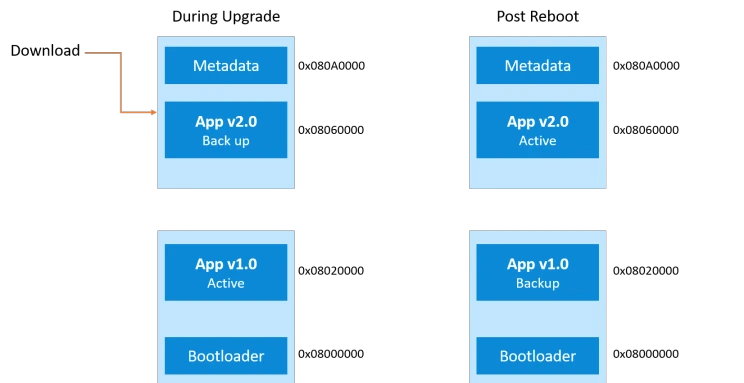
The way you structure your firmware over‑the‑air fleet system has a bigger impact than many teams expect. It decides how much you spend on data, how often you brick devices, and how painful rollbacks are when something goes wrong. In practice, most fleets lean on three patterns:
Full image updates, delta binary diff updates, and A/B partition schemes. You can mix them, but you need to understand the tradeoffs before you pick your default.
Full Image Updates
Full image updates ship an entire firmware image to the device and overwrite the existing one in a single flashing step. The device doesn’t care what version it was running before, it just gets a complete replacement.
Characteristics:
- Simplicity: The device downloads one big binary and flashes it. There are fewer code paths to test and fewer weird “diff from version X to Y” surprises.
- High bandwidth usage: Every vehicle pulls down the full image, even if you changed only a small portion of the code.
- Predictable behavior: Because you always deliver a complete image, you don’t depend as heavily on what’s currently installed.
Pros for fleet OTA:
- Very forgiving when devices are scattered across many different firmware revisions. You just say, “Everyone, move to this one.”
- Easier to validate in QA. You test the exact image that’s going to run, not dozens of diff combinations.
- Supported out of the box by platforms like AWS IoT Device Management, Azure Device Update, and the Mender OTA platform.
Cons:
- Chews through cellular data fast, especially with images measured in tens or hundreds of megabytes.
- Longer download times make updates more likely to timeout or fail in areas with weak signal or roaming issues.
Full image updates are a good fit when your firmware is small, like 1–2 MB microcontroller targets, or when you can reliably use depot WiFi or yard networks so cellular bandwidth isn’t getting hammered. A lot of fleets start with full images for early hardware and then add more sophisticated strategies as sizes grow.
Delta Binary Diff Updates
Delta binary diff updates only send what changed between the firmware version installed on the device and the new version you want it to run. The device reconstructs the full new image locally by applying the delta to its current firmware.
EAV breakdown – Delta binary diff update:
- Bandwidth saving vs full image: Commonly 70–90% less data, especially when you tweak small parts of a large firmware image.
- Generation complexity: High. You have to generate diffs for each allowed source–target pair, often with tools like bsdiff, and wire this into an OTA backend such as the Mender OTA platform.
- Rollback capability: Weaker than A/B. Usually you need a full image or another delta to go back.
- Fleet suitability: Excellent for bandwidth‑constrained fleets with strict data plans and frequent small updates.
- Tools: Common open‑source tools include bsdiff and xdelta, backed by OTA servers that understand how to pick and ship the right delta.
Pros for fleet OTA:
- Dramatically lower cellular bills, especially in international fleets with pricey roaming.
- Shorter downloads mean you get far fewer partial updates and a higher success rate under spotty connectivity.
Cons:
- You need tight control over base versions. If a device is on some unexpected version, the delta won’t apply cleanly and you’re stuck.
- Your pipeline gets more complex. Every new release may need several different deltas built and tracked.
- Rolling back isn’t as simple as flipping a flag like in A/B partitioning.
Delta firmware update fleet strategies shine when you already enforce version discipline, usually through a central OTA manager that knows exactly what each unit is running. They’re ideal for steady, incremental changes like edge AI model updates via OTA, configuration tweaks, or minor protocol updates instead of big base OS upgrades.
A/B Partition with Rollback
A/B partition schemes, sometimes called dual‑bank flash or dual partition, keep two complete firmware slots on the device: an “A” slot that’s currently active and a “B” slot sitting idle. OTA updates write the new firmware into the inactive slot, then the device reboots into that slot.
EAV breakdown – A/B partition scheme:
- Flash requirement: Roughly double your firmware size, since you store A and B side by side.
- Rollback speed: Instant. If something’s wrong, you just flip back to the other partition on the next boot.
- Update reliability: Very high. The new firmware usually has to prove it’s “good” before the system commits to it.
- Downtime: Close to zero. The heavy lifting happens on the inactive partition, and the switch happens across a reboot.
- Fleet suitability: Excellent for always‑on, safety‑critical devices that you don’t want to take offline for long.
Pros for fleet OTA:
- Strong brick protection. If the new image is bad or gets corrupted, the bootloader’s recovery logic just falls back to the previous partition.
- Makes staged validation easier, because you can boot the new image, run checks, and only mark it “good” once it behaves.
- Allows actual A/B testing. You can run different firmware on slices of the fleet and compare behavior.
Cons:
- You pay for extra flash in your BOM, which isn’t free at large volumes.
- The bootloader needs to handle secure boot, versioning, rollback policies, and partition selection logic correctly. That adds design and test work.
For connected vehicles and fleet telematics devices touching safety‑relevant functions, A/B partitioning with rollback is widely treated as the gold standard.
In practice, teams often combine it with delta updates, writing a delta into the inactive slot, and lean on secure boot on ARM TrustZone capable MCUs or SoCs to keep the whole chain trustworthy.
Staged Rollout Strategies for Fleet OTA
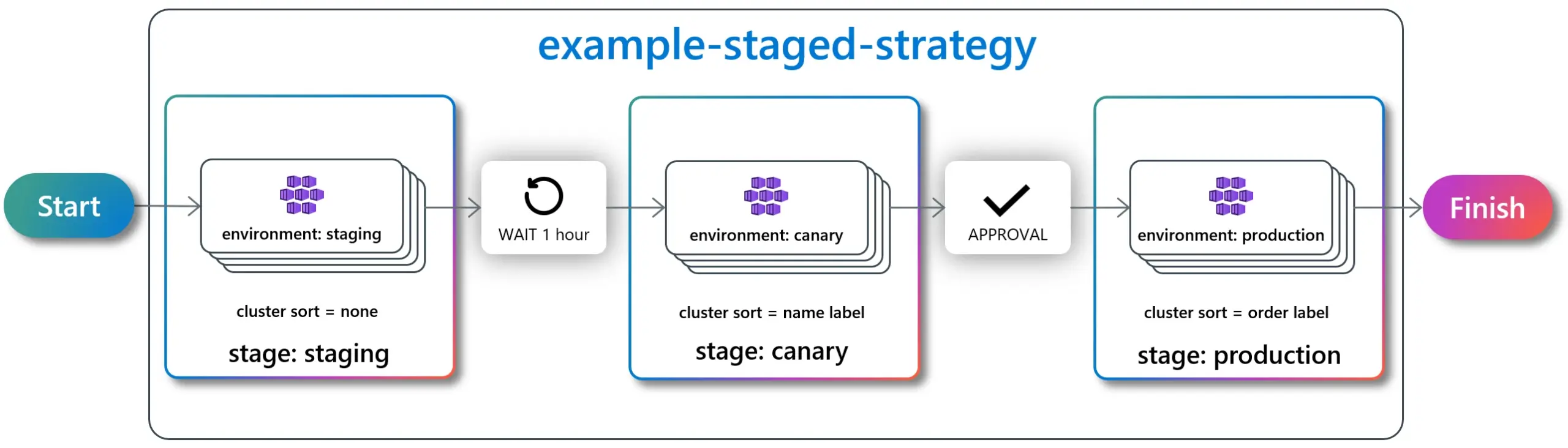
The architecture keeps you from hard‑bricking things. The rollout strategy keeps you from shipping a bad update to everyone at once. Even with a rock‑solid design, bugs slip through. That’s normal. The mistake is letting those bugs hit 100% of your vehicles in the same evening.
A good OTA update strategy for connected vehicles uses staged rollout as a safety valve. You start small, watch real‑world behavior, and only then open the taps.
Core Elements of a Staged Rollout Strategy
EAV breakdown – Staged rollout strategy:
- Canary percentage: Begin with a tiny slice of the fleet, often 1–5%. These vehicles are your early warning system.
- Gate criteria: Don’t move up a stage unless success rates exceed a defined threshold (typically 98–99%) and you’re not seeing new critical errors.
- Geographic segmentation: Roll out by region so you localize problems and account for different network conditions and operating patterns.
- Vehicle‑type segmentation: Separate by model, hardware revision, or device type. Mixed hardware under one rollout is how you discover that revision B has a timing bug while revision A doesn’t.
- Full rollout timeline: Think in days, not hours. You want enough time to see real‑world usage patterns, not just boot and idle behavior.
Example Staged Rollout for Fleet OTA
A realistic OTA update fleet telematics rollout often looks something like this:
- Stage 0 – Lab & pilot vehicles: Bench rigs, test racks, and a handful of internal or friendly customer vehicles you can get your hands on quickly if needed.
- Stage 1 – Canary deployment (1%): Randomly chosen vehicles in stable regions with good connectivity and responsive local teams.
- Stage 2 – Expanded canary (5%): Add more geographies and a broader mix of hardware once Stage 1 behaves.
- Stage 3 – Partial rollout (25%): Push to a quarter of the fleet, watching your dashboards for anomalies and rollback spikes.
- Stage 4 – Fleet‑wide rollout (100%): Only after you’ve passed all gates at the smaller stages and operations are confident.
Your success gate criteria should be written down, agreed, and wired into the platform so people don’t “just push it” out of impatience. Common KPIs include:
- Update success rate KPI: Percentage of devices that download, flash, reboot, and then check in healthy.
- Rollback rate: How many devices triggered OTA rollback fleet logic through the bootloader or OTA agent.
- Post‑update error logs: Any new crash signatures, CPU or memory spikes, degraded connectivity, or sensor faults that weren’t seen before.
Automatic Rollback Triggers
Human judgment is useful, but for high‑scale OTA you also need hardwired automatic rollback rules. Your fleet device OTA management system should be prepared to pull the ripcord based on signals like:
- Failure to boot into the new firmware within a set timeout or a certain number of attempts.
- Health‑check failures, like missing telemetry heartbeats, watchdog resets, or missing sensor data within a defined period.
- Excessive crash loops or key processes restarting repeatedly.
On A/B partition devices, rollback is as simple as flipping the active partition flag back to the known‑good slot through the bootloader recovery path. On single‑partition devices, you usually end up downloading and reflashing a previous full image, which is slower and more expensive. That’s another reason many teams gradually migrate critical hardware to A/B schemes.
Expert tip: Don’t trust gut feeling for rollout decisions. Use your OTA platform to enforce promotion gates driven by live metrics, not by whoever’s on call and tired at 2 AM.
Security Requirements for Fleet OTA (Uptane, Code Signing, Secure Boot)
As soon as you open up OTA, you’re exposing a new attack path straight into your vehicles. Attackers don’t have to touch a truck if they can tamper with an update server. That’s why automotive standards emphasize securing the entire pipeline: from the signing keys, to how you serve artifacts, to what the bootloader will accept.
Uptane Framework
The Uptane security framework is an automotive‑oriented extension of TUF (The Update Framework). It was built with ECUs and connected vehicles in mind, not generic laptops or phones, so it accounts for multi‑ECU setups, intermittent connectivity, and long vehicle lifetimes.
EAV breakdown – Uptane security framework:
- Designed for: OTA in vehicles, covering ECUs, telematics units, and related fleet telematics devices.
- Protection against: Rollback attacks, freeze attacks, and mix‑and‑match attempts where someone tries to assemble old components into a compromised system.
- Adoption: Used or trialed by major OEMs and suppliers, with documented profiles driven through IEEE/ISTO standards.
- Fleet relevance: Very high once you’re dealing with multiple ECUs or supplier‑provided components that all need coordinated updates.
- Standard reference: Profiled in IEEE/ISTO documents and referenced by several automotive cybersecurity programs.
Uptane introduces a few concepts that are especially helpful at fleet scale:
- Separating metadata from the actual payload, so devices can verify what they should download before they burn data pulling a big file.
- Role separation and key hierarchies, where different keys sign different types of metadata. That way, one key leak doesn’t compromise the entire system.
- Explicit protections against replaying old updates, mixing mismatched versions, or pinning devices at obsolete firmware.
For fleets that need to work with OEM systems or coordinate multiple ECU suppliers, aligning OTA with Uptane or TUF principles saves a lot of pain during audits and penetration tests.
Code Signing & Verification
Code signing certificates are what stand between you and a rogue firmware image. Without code signing, anyone who can talk to the device in the right way can try to flash their own software. With proper code signing, the device only accepts firmware that you or your trusted signing process created.
Best practices that work well in real deployments:
- Sign firmware images and update manifests with private keys locked inside Hardware Security Modules (HSMs), not on a random build server.
- Have devices verify signatures before they install anything, using public keys burned into secure storage or a secure element.
- Use short‑lived signing keys and a clear rotation and revocation plan so you can react if a key is ever suspected of being compromised.
Your update manifest is where devices get their marching orders. It should include at least:
- The target firmware version, with allowed source versions if you’re doing delta binary diff update flows.
- Hashes or checksums of the firmware image or delta payload, so you can verify integrity chunk by chunk.
- Metadata such as image size, target partition, device class, dependencies, and any pre‑ or post‑update hooks.
OTA services like AWS IoT Device Management and Azure Device Update can handle a lot of the code signing plumbing, but they won’t design your key hierarchy, rotation cadence, or manifest structure for you. You still have to get those pieces right.
Secure Boot Chain & Brick Prevention
A secure boot chain starts at a hardware root of trust. Each stage of the boot process only hands control to the next stage if that next stage is signed correctly. On many fleet devices that means using secure boot on ARM TrustZone capable controllers or SoCs backed by fuses or secure key storage.
Core pieces of a good secure boot and brick‑prevention setup:
- Immutable bootloader core: A minimal, locked‑down bootloader in ROM or protected flash, signed by the OEM and very rarely (if ever) updated.
- Signature verification for firmware before the device switches to a new A/B partition or overwrites an existing one.
- Bootloader recovery behavior that detects verification failures, bad boots, or watchdog resets and then falls back to a known‑good image.
These mechanisms are what stop a single bad update from turning thousands of devices into hard bricks. Without them, a glitchy network transfer or a targeted attack can leave you with hardware that can’t even boot far enough to repair itself.
UNECE WP.29 & ISO 24089
Regulators have started writing all these best practices into formal rules. For fleets that operate in Europe, Japan, and other UNECE markets, you can’t just improvise an OTA story anymore.
UNECE WP.29 OTA regulation EAV:
- Scope: Covers vehicle software updates, including OTA deliveries to ECUs and related systems.
- Mandate date: Applies to new vehicle types from 2024 onward in participating jurisdictions.
- Certification requirement: You need a Software Update Management System (SUMS) approved as part of type approval.
- Fleet operator obligation: Keep documented procedures, traceability of what was updated where, and cooperate with OEMs.
- Enforcement: No SUMS, no type approval, which means vehicles don’t get sold in those markets.
ISO 24089 is the OTA software update management standard that fills in the detailed process and documentation expectations behind WP.29. It describes how to structure the update lifecycle, from planning and risk assessment to rollout and post‑deployment review. Deep functional‑safety specifics live in other standards, but ISO 24089 is the anchor for OTA process expectations (for more on this, see ISO 24089 OTA compliance and ISO 26262 resources).
At a minimum you should:
- Document your OTA processes end to end, with named roles, approvals, and decision points.
- Keep precise records of which vehicles received which software, when, and under whose authorization.
- Be able to show risk analyses and mitigations for OTA changes, especially those that touch safety or cybersecurity.
Designing your firmware over‑the‑air fleet processes to line up with UNECE WP.29 and ISO 24089 pays off when an auditor shows up or when something goes wrong and lawyers get involved.
Bandwidth and Connectivity Challenges for Fleet OTA

If there’s one constraint that bites fleets hardest, it’s connectivity. Vehicles disappear into tunnels, back roads, and rural depots. Some sit on roaming networks with tiny data caps. All of that feeds back into how you design your OTA update strategy for connected vehicles.
Cellular Data Cost at Scale
A single firmware image doesn’t look huge on its own. But multiply it by thousands of vehicles and bandwidth bills start to sting. A 50 MB full image pushed to 10,000 vehicles is 500 GB of data. If half of that goes across cellular and your blended rate is $5/GB, you’re burning around $1,250 on that campaign alone, and that’s a modest example.
To keep that under control, fleets lean on a few techniques:
- Favor delta binary diff updates where you can, so you’re sending 10–30% of the full image size instead of 100% each time.
- Apply compression matched to your payload. LZ4 is fast and light on CPU, zstd or similar can squeeze bandwidth harder if your hardware can handle it.
- Separate big AI models and configuration bundles from the core firmware, so you’re not shipping the OS again when all you changed was a new detection threshold.
Depot WiFi & Cellular Window Scheduling
The cheapest data is the data that never touches a cellular network. That’s where depot WiFi and smart scheduling come in. Well‑designed fleets use the device agent to “prefer” certain pipes and time windows instead of yanking updates as soon as they’re available.
Typical tactics include:
- Queuing non‑urgent updates for delivery over depot WiFi or yard networks when vehicles pull in for fuel, inspections, or loading.
- Using cellular window scheduling to download at night or during off‑peak hours, or during specific cheap data windows negotiated with carriers.
- Delaying lower‑priority campaigns if the device reports low signal quality, roaming, or very slow throughput.
Cloud tools like AWS IoT Device Management and Azure Device Update can schedule campaigns, but you still need the on‑device agent to respect those rules and make smart local decisions about when to start or pause downloads.
Resume‑Capable Downloads & Intermittent Connectivity
In the real world, vehicles don’t sit still with perfect 4G signal for 30 minutes at a time. They drop in and out of coverage. So your download logic has to tolerate that, or you’ll spend half your life retrying failed updates.
For OTA to work reliably on the road, firmware downloads should support:
- Chunked transfers with per‑chunk integrity checks, so you only ever write known‑good data to flash.
- Resumption from the last verified chunk after any connectivity loss, power cycle, or reboot.
- Sane timeout and retry rules so you’re not burning data on endless retries when the vehicle is out in a dead zone.
A solid implementation will track partial progress in non‑volatile storage and validate every chunk against the manifest’s hash before appending it to the image. That’s especially important for large edge AI model updates via OTA that can easily run into hundreds of megabytes if you’re moving full models around.
Priority Queuing: Security vs Features
Another place fleets get into trouble is treating all updates the same. Security fixes, bug fixes, and new features don’t deserve identical priority when bandwidth and time are limited.
Your OTA system should at least split updates into:
- Security‑critical: High priority, moved even if it eats extra cellular and pushes other work back.
- Stability/bug fix: Important, but typically scheduled with normal staged rollout and bandwidth rules.
- Feature/optimization: Nice to have. These can wait for better coverage, depot WiFi, or low‑cost windows.
A good priority queue, tied to bandwidth‑aware scheduling, ensures that security patches don’t get stuck behind a dozen cosmetic or analytics improvements in your backlog.
How Resolute Dynamics Manages OTA Across 200K+ Connected Vehicles
To make this less abstract, let’s look at how a large operator might approach it. Resolute Dynamics is a hypothetical but realistic example of a company running an OTA pipeline for over 200,000 connected vehicles across more than 20 countries. Their setup mixes full image, delta updates, and A/B partitioning to match different device types and risk levels.
Resolute Dynamics OTA Pipeline Overview
The Resolute Dynamics OTA pipeline is built on top of cloud services similar to AWS IoT Device Management and Azure Device Update, with security modeled after TUF and the Uptane security framework. The idea is to combine proven cloud plumbing with automotive‑grade update logic.
Key elements of their pipeline include:
- Device registry: A live catalog of each device’s hardware revision, installed firmware version, geographic region, and vehicle type, so campaigns target the right hardware.
- Artifact management: Versioned storage for full images, delta binary diff updates, AI model bundles, and configuration packages, each with signed manifests.
- Policy engine: Central rules that define segmentation, staged rollout steps, success gates, and who’s allowed to approve what.
- Security stack: Code signing using HSM‑backed keys, Uptane‑style roles, and alignment with a secure boot chain on the devices.
Staged Rollout by Region & Vehicle Type
Resolute doesn’t treat its entire fleet as one blob. It uses geographic and vehicle‑type segmentation so it can limit blast radius and respect how different vehicles are used day to day.
- Initial canaries are often in regions with strong connectivity, supportive local teams, and lower operational risk.
- Heavy‑duty trucks, light‑duty vehicles, and specialty equipment run in separate rollout groups, since downtime and usage patterns differ.
- Operations teams are looped in before major firmware campaigns that could affect mission‑critical features like ELD, safety cameras, or control functions.
Typical campaigns flow through several stages over a few days, with automatic promotion only after passing gates tied to update success rate KPI, rollback events, and key telemetry signals like CPU load or error counts.
Delta Updates for Edge AI Models
Modern fleets live or die on the quality of their AI models, but those models can be big. Resolute leans heavily on delta updates for AI payloads, while trying to keep the underlying firmware relatively stable.
In practice:
- Core firmware for telematics and camera devices is updated less frequently, often using full images or A/B partitioned full updates.
- AI models, feature extractors, and related config files are updated more often with delta binary diff updates tuned to minimize changes in large matrices.
- Model updates are tracked in separate manifests so teams can roll back a model without touching the base firmware, or test new models on a subset of vehicles.
This keeps cellular usage sane and lets the data science and safety teams iterate quickly. The underlying system stays steady, while the edge AI behavior evolves in controlled steps, as outlined in more depth in edge AI model updates via OTA.
A/B Partitioning on Capture Devices
For safety‑critical “Capture” devices, such as multi‑sensor recorders that need to log incidents flawlessly, Resolute goes all‑in on A/B partition scheme designs with dual‑bank flash.
- Updates are streamed into the inactive bank using chunked, resumable transfers that can survive trips through dead zones.
- The secure bootloader validates signatures and checks a few basic health markers, then flips the active partition bit.
- If post‑update health checks fail, the bootloader automatically rolls the device back on the next reboot, often without the driver even noticing.
This gives near‑instant rollback and almost no downtime. For devices that exist to capture safety and compliance data, that combination is not a luxury. It’s a requirement.
Fleet‑Wide Update Health Dashboard
Resolute also runs a dedicated OTA operations dashboard. Without something like this, you’re basically blind once you hit “deploy.” Their dashboard tracks:
- Per‑region update success rate KPI, median and worst‑case time‑to‑update, and how many devices are still pending.
- Counts of devices that succeeded, are in progress, failed, or triggered rollback over the last 24 hours and per campaign.
- Bandwidth usage by campaign and by region, to avoid carrier bill surprises.
- Downstream effects, like whether an update correlates with changes in crash rates, false positives, or sensor error rates.
That level of visibility makes a big difference when you’re trying to run safe, repeatable OTA update fleet telematics campaigns and show alignment with frameworks like UNECE WP.29 and ISO 24089.
Common Mistakes in Fleet OTA (and How to Fix Them)
After watching enough fleets grow, you start seeing the same OTA mistakes repeat. The good news is they’re fixable if you catch them early.
Mistake 1: All‑at‑Once Rollouts
Problem: Teams push an update to 100% of the fleet in one shot. If there’s a serious bug, it hits everyone, and you end up scrambling to figure out how to roll back while drivers are already on the road.
Fix: Enforce staged rollouts with canary deployment, geographic and vehicle‑type segmentation, and hard promotion gates. Your OTA platform should make an “all‑at‑once” deployment impossible without jumping through a lot of approvals.
Mistake 2: No Hardware‑Backed Rollback Mechanism
Problem: Devices with a single partition overwrite their only firmware image in place. If the update fails mid‑flash, or if the new image is bad, the device may never boot again without physical intervention.
Fix: Where you can, design in A/B partition schemes or dual‑bank flash up front. Where that’s not possible, at least implement a resilient bootloader recovery flow that can drop into a safe mode and accept a known‑good image without special tools.
Mistake 3: Weak or Absent Code Signing
Problem: Some fleets still allow unsigned or poorly signed firmware. That leaves the door wide open for attackers who can get into the network or compromise an update server.
Fix: Make signature verification mandatory for every update, tie it into a secure boot chain, and keep signing keys in HSMs. Regularly test what happens when a device sees an invalidly signed image or a manifest with tampered metadata.
Mistake 4: Ignoring Bandwidth Economics
Problem: Engineering teams treat OTA as “free” from a bandwidth perspective, so they push big full images often. Then someone in finance notices the carrier invoices.
Fix: Introduce a delta binary diff update strategy where it makes sense, along with compression and depot WiFi usage. Treat bandwidth as a first‑class constraint when planning release cadence and payload sizes.
Mistake 5: No Clear Ownership or Process
Problem: OTA is run informally. Releases happen via ad‑hoc scripts, and there’s no clear answer to “who approved this firmware?” or “which vehicles got which version?” That’s a disaster during incidents and compliance checks.
Fix: Stand up an OTA Software Update Management System aligned with UNECE WP.29 and ISO 24089. Define roles, approvals, and audit trails. Treat OTA like any other safety‑relevant engineering process, not a pet project.
Step‑by‑Step: Designing an OTA Firmware Update Strategy for Your Fleet
Step 1: Classify Devices and Risk Levels
Start by sorting your devices into buckets. A core telematics unit that feeds compliance data sits in a different risk category than a cab display showing driver tips. Same story for AI cameras, gateways, and auxiliary sensors. Higher‑risk devices deserve more protection: A/B partition schemes, safer rollout policies, and stricter testing.
Step 2: Choose Your Update Architectures
- Use A/B partition + full image for safety‑critical or always‑online devices where downtime or bricks are unacceptable.
- Use delta binary diff update strategies for payloads that are big and change often, like AI models and large configuration bundles.
- Reserve single‑partition full image updates for small, low‑risk microcontrollers that have robust bootloader recovery logic and are cheap to touch if something goes wrong.
Step 3: Define Security Baseline
- Implement code signing with keys protected by HSMs and make signature verification mandatory on devices.
- Shape your bootloader and backend logic around TUF/Uptane security framework principles so you’re covered against replay and tampering.
- Turn on secure boot on ARM TrustZone or equivalent hardware and prove that an unsigned image simply won’t run.
Step 4: Implement Staged Rollout & Rollback Policies
- Define canary deployment percentages and stages, typically 1–5% → around 25% → the remainder, with optional lab and pilot stages before that.
- Spell out success thresholds and health checks that must pass before a rollout advances.
- Automate rollback triggers inside both the OTA platform and the bootloader so you’re not relying on manual action during a bad night.
Step 5: Plan for Connectivity Constraints
- Give your device agent bandwidth‑aware logic and cellular window scheduling so it avoids the worst times and networks where possible.
- Use resumable, chunked downloads with per‑chunk checksums to survive real‑world connectivity drops.
- Time large updates so they land when vehicles are likely to be on depot WiFi or in coverage sweet spots, not halfway up a mountain pass.
Step 6: Integrate Monitoring & Compliance
- Build dashboards to track update success rate KPI, rollback counts, per‑campaign failures, and bandwidth use across regions and device types.
- Document your processes, approval flows, and records so you can show alignment with UNECE WP.29 SUMS and ISO 24089 expectations.
- Hook your OTA flows into your existing cloud infrastructure for OTA so logs, artifacts, and metrics live alongside your other fleet data.
Comparison Table: Full Image vs Delta vs A/B Partition
The table below gives a quick side‑by‑side comparison of the three main OTA approaches. In real deployments, most fleets end up using a mix, choosing the approach that fits each device class best.
| Aspect | Full Image Update | Delta Binary Diff Update | A/B Partition Scheme |
|---|---|---|---|
| Bandwidth usage | High (100% of image) | Low (often 10–30% of full) | Depends on full vs delta used per slot |
| Generation complexity | Low | High (per‑version diffs) | Medium–high (requires specialized bootloader) |
| Rollback capability | Requires re‑flashing previous image | Limited; usually via full image rollback | Instant partition flip; best‑in‑class |
| Flash requirement | 1× firmware size | 1× firmware size | 2× firmware size (dual‑bank flash) |
| Downtime | Medium (depends on flash time) | Medium (similar to full after reconstruction) | Low; zero‑downtime handover on reboot |
| Fleet suitability | Smaller payloads or strong WiFi coverage | Bandwidth‑constrained fleets with frequent updates | Safety‑critical devices and high reliability fleets |
FAQ
How do you recover from an OTA update failure in a fleet device?
It hinges on your architecture. With an A/B partition scheme, the bootloader tracks whether the new slot boots and passes health checks. If it doesn’t, it flips back to the previous slot automatically, often without any operator action. On single‑partition devices, recovery depends on a bootloader recovery path that can re‑flash a known‑good image, either triggered by a watchdog, a special button sequence, or a maintenance‑mode command. Platforms like the Mender OTA platform and AWS IoT Device Management can help by detecting failures and re‑scheduling updates, but they still rely on sane bootloader behavior underneath.
How much does an OTA update cost over cellular for a large fleet?
Rough math: image size × number of vehicles × fraction done over cellular. For example, a 50 MB full image across 10,000 vehicles is 500 GB. At $5/GB, that’s around $2,500 if all of it hits cellular. If you switch to delta binary diff updates that are 80% smaller and manage to push half the traffic over depot WiFi, you can cut that bill by roughly an order of magnitude. Compression and bandwidth‑aware scheduling are your main knobs.
What regulations affect OTA firmware updates for connected vehicles?
The UNECE WP.29 cybersecurity and software update regulations require OEMs, and indirectly fleet operators, to run a Software Update Management System (SUMS) with documented OTA processes, traceability, and risk handling for new vehicle types from 2024 onward in participating markets. ISO 24089 is the detailed OTA software update management standard that describes what a sound update process looks like. Enforcement flows through type approval, but fleets still need records and discipline so OEMs can demonstrate compliance.
How often should I push OTA updates to fleet telematics devices?
Most fleets end up with a steady rhythm of a few feature or optimization releases per quarter, and then ad‑hoc security patches whenever vulnerabilities show up. Critical security fixes should go out quickly using high‑priority rollouts, while minor improvements can be batched to save bandwidth and reduce churn. Devices that handle sensor calibration via OTA or frequent AI model updates may see smaller but more frequent changes on those specific payloads.
How do you prevent bricking during OTA firmware updates?
Brick prevention is layered. You start with A/B partitioning or dual‑bank flash where possible, add a robust bootloader recovery path, tie in secure boot and signature checks so corrupted or malicious images never run, and use resumable downloads with integrity checks so bad chunks don’t get flashed. On top of that, you run staged rollouts and automatic rollback thresholds so a bad release hits only a small slice, not your entire fleet. Hardware‑in‑the‑loop testing before big campaigns is what catches many edge cases before they ever see a live vehicle.
Which OTA platforms are commonly used for fleet devices?
Common choices include the Mender OTA platform (both open‑source and commercial), AWS IoT Device Management, and Azure Device Update. Larger fleets often end up with hybrid setups that embed Uptane/TUF for security, plug into their internal CI/CD tooling, and use their existing cloud infrastructure for OTA to distribute artifacts globally and centralize logging.
Is delta firmware always better than full image for fleets?
No. Delta shines when firmware images are large and you keep device versions tightly under control, because you get big bandwidth savings. But you pay for that in complexity and in the need to manage many source‑to‑target combinations. Full image updates are simpler and more forgiving, especially early on. A/B partitioned full images give you the strongest rollback behavior. Many fleets run a hybrid: full images for infrequent core changes and bootloaders, delta updates for frequent AI model and configuration updates.
How does secure boot relate to OTA updates?
Secure boot is the guardrail that keeps OTA from becoming an attack vector. During OTA, your device might store multiple images or partial downloads. Secure boot makes sure that only images signed with trusted keys will ever run, by verifying signatures against built‑in public keys at boot time. On hardware backed by secure boot on ARM TrustZone, that chain of trust starts at silicon and flows up through the bootloader to the OS and applications. Even if a network path is compromised, a malicious firmware image should fail verification and never execute.
Final Summary & Next Steps
For connected fleets, OTA firmware update strategies aren’t side projects anymore. They’re part of core operations. As you scale, you have to think in terms of:
- Robust OTA architectures (full image, delta, A/B partition) matched to each device’s risk profile and bandwidth reality.
- Secure, standards‑aligned pipelines using Uptane/TUF patterns, code signing, and secure boot to keep attackers and corrupted payloads out.
- Staged rollouts and automatic rollback so a bad build is a small incident, not a fleet‑wide outage.
- Connectivity‑aware scheduling, compression, and update prioritization so your cellular costs don’t spiral.
- Operational visibility and documented processes that support UNECE WP.29 and ISO 24089 expectations and make incident response manageable.
If you already own a connected fleet, a practical next step is to audit what you have now: How are updates built, signed, rolled out, monitored, and rolled back? From there, close gaps in security, brick prevention, and observability, then align your processes with regulatory‑grade OTA practices.
For deeper dives around this stack, take a look at:
- Edge AI model updates via OTA
- Sensor calibration via OTA
- Cloud infrastructure for OTA
- ISO 24089 OTA compliance and functional safety considerations
Getting OTA right early saves you from expensive retrofits and rushed recalls later, and it keeps your vehicles safer, more up to date, and more competitive mile after mile.